
Stops you before you visit known phishing and malware sites
nuDefend Browser Guard is a free browser extension. If you open a site already known for phishing (impersonating a trusted source) or spreading malware (harmful software), the extension warns and stops you. A clear warning appears instead of the site.
Available now for Edge and Firefox. Coming soon to Safari and Chrome.
- Free, with no ads
- No account or sign-up
- Sites are checked in your browser
- No tracking of your browsing
How it works: three steps
Install the extension
Add the extension from your browser’s store in one click. No account or setup needed. Protection starts right away.
Browse as usual
Every site you open in a tab is quietly checked against the threat list, right in your browser.
See the warning
If a site is known to be dangerous, a clear warning page appears instead. From there, you can return to safety in one click.
Want to see it work?
Open our test address. The extension always stops visits to it, so if protection is active, you’ll see the warning page instead.
How it helps you
A warning before you enter
When you open a site known to be dangerous in a tab, a warning appears instead of the page. From there, you can go back to safety.
A list that keeps updating
The list includes more than 400,000 known phishing and malware sites and is updated several times a day.
You stay in control
Think a site was blocked by mistake? Let us know with a click, or continue to the site if you're sure it's safe.
Share less of your home network, when you choose
In the extension settings, you can limit IP address exposure through WebRTC, a browser communication feature, so sites cannot see your computer's local network addresses. This option is off by default, and you can turn it on with a click.
See which sites were recently blocked
Open the extension window to see recently blocked sites: each site’s name, when it was blocked, and how many attempts were made to visit it. The list stays in this browser only, is never sent to us, and can be cleared with a click.
Install for your browser
Edge
Available nowAdd the extension from the Edge add-ons store in one click. Protection starts as soon as it’s added.
Firefox
Available nowAdd the extension from the Firefox add-ons store in one click. Protection starts as soon as it’s added.
SafariiPhone, iPad and Mac
Coming soonOne app for iPhone, iPad and Mac, currently under review by Apple. After installing it, enable the extension in Safari settings.
Chrome
Coming soonThe Chrome version is on its way. In the meantime, you can use the extension in Edge or Firefox.
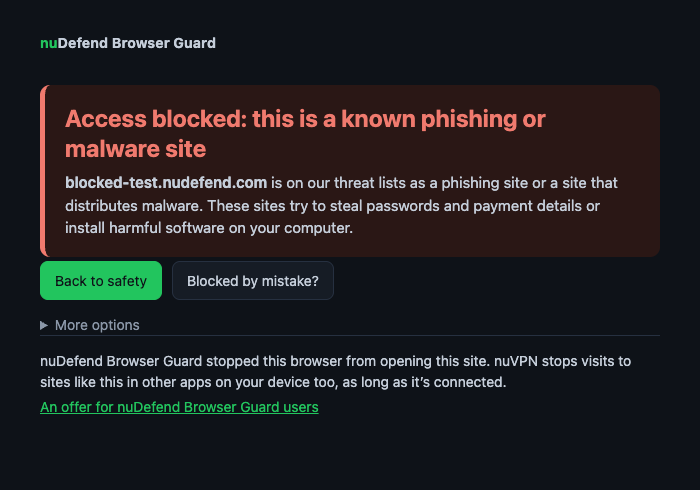
What the warning looks like
This warning appears instead of the dangerous site. From here, you can go back, report a site blocked by mistake, or continue anyway.
Privacy, in plain English
Sites are checked in your browser without sending us your browsing history. No ads, no tracking, and no selling your data.
Exactly what gets sent from your browserProtection beyond your browser
nuDefend Browser Guard protects this browser. nuVPN, our VPN service, also stops visits to known phishing and malware sites in other apps on your device while the service is connected.
The full guide
Find full instructions for installing in each browser, checking protection, using the warning page, extension window and settings, and troubleshooting.
Frequently asked questions
How much does it cost?
Nothing. nuDefend Browser Guard is free, with no ads and no account required.
Which browsers does it work with?
Available now for Edge and Firefox. Coming soon to Safari (iPhone, iPad and Mac) and Chrome.
How can I check that protection is active?
Open the test address blocked-test.nudefend.com. If the extension’s warning page appears, protection is active. If you see a page explaining that the test address wasn’t blocked, the extension isn’t active in this browser.
Does it work on iPhone?
Soon. The Safari version for iPhone, iPad and Mac is under review by Apple and will be available on the App Store.
What if a safe site is blocked?
The warning page has a "Blocked by mistake?" button. Your report helps us correct the list. If you're sure the site is safe, you can continue to it anyway.
Does the extension send you the sites I visit?
No. Sites are checked in your browser, and your browsing history is not sent to us. You'll find the full details in the extension's privacy policy.
Have a question about the extension? Write to us: support@nudefend.com